
Engagement Rate Formula: How to Calculate It by Views, Followers and Reach
The three engagement rate formulas, which one to use on YouTube, Instagram, TikTok, Facebook and LinkedIn, worked examples, what a good rate looks like and how to raise yours.
By The Xilfy Team 7 min read
 Try it: YouTube Engagement Rate Calculator
Engagement rate of any video or channel
Engagement rate tells you how many of the people who saw a post actually reacted to it. The idea is simple, but there are three common ways to calculate it, and they can give very different numbers for the same post. This guide shows each formula, which one suits YouTube, Instagram, TikTok, Facebook and LinkedIn, and how to judge whether your rate is any good.
Quick answer
Engagement rate = interactions ÷ audience × 100
- Interactions are likes, comments and shares (plus saves or clicks on some platforms).
- Audience is one of three things: views, followers or reach.
| Formula | Divide by | Best for |
|---|---|---|
| Engagement rate by views | Views of the post | YouTube, TikTok, Reels and any video |
| Engagement rate by followers | Followers or subscribers | Comparing accounts, influencer pitches |
| Engagement rate by reach | Unique accounts that saw it | Instagram and Facebook, from your own insights |
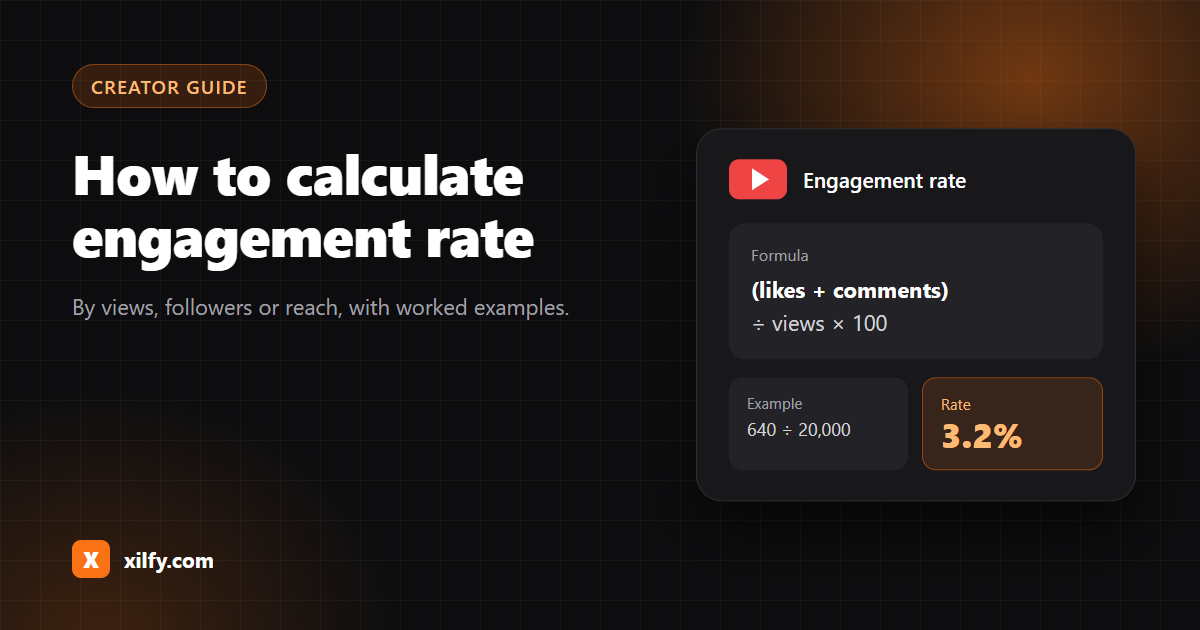
On YouTube the most useful version is (likes + comments) ÷ views × 100, because views and those two counts are public on every video. A 20,000-view video with 600 likes and 40 comments has an engagement rate of 640 ÷ 20,000 × 100 = 3.2%.
What counts as engagement
An interaction is any action that shows someone did more than scroll past. What you can count depends on the platform and on whether you are looking at your own analytics or someone else's public post.
| Platform | Public counts | Extra counts in your own analytics |
|---|---|---|
| YouTube | Views, likes, comments | Shares, dislikes, subscribers gained |
| Likes, comments (likes can be hidden) | Saves, shares, reach | |
| TikTok | Views, likes, comments, shares, saves | Reach, watch time |
| Reactions, comments, shares | Reach, link clicks | |
| Reactions, comments, reposts | Impressions, clicks, follows |
Pick one definition and stick to it. A rate that includes shares and saves will always look higher than one built from likes and comments only, so only compare numbers worked out the same way.
Formula 1: engagement rate by views
(Likes + comments + shares) ÷ views × 100
This is the fairest measure for video, because everyone counted in the bottom of the fraction actually watched. It's also the only formula you can work out for any public YouTube or TikTok video without access to its analytics.
Worked example (YouTube): a video has 48,000 views, 1,900 likes and 210 comments.
- Interactions: 1,900 + 210 = 2,110
- Engagement rate: 2,110 ÷ 48,000 × 100 = 4.4%
If you own the video, YouTube Studio also shows shares. Add them in: with 90 shares the rate becomes 2,200 ÷ 48,000 × 100 = 4.58%.
The YouTube engagement rate calculator uses this formula. Paste a video link and it reads the public views, likes and comments; type shares from YouTube Studio if you have them. Paste a channel link or @handle instead and it adds up the likes, comments and views of the channel's recent uploads (up to the last 50) for an average rate, and lists the most engaging videos.
Formula 2: engagement rate by followers
(Likes + comments + shares) ÷ followers × 100
This is the version most influencer reports and brand pitches use, because follower counts are public and it lets you compare accounts of different sizes. Its weakness is that followers aren't the people who saw the post: a post can be shown to far more or far fewer people than follow the account.
Worked example (Instagram): an account has 25,000 followers. A post gets 700 likes and 45 comments.
- Interactions: 745
- Engagement rate: 745 ÷ 25,000 × 100 = 2.98%
For an average across several posts, add up the interactions of the last 10 or 12 posts, divide by the number of posts, then divide by followers. On YouTube the same idea is "by subscribers", which the calculator shows as a second figure if you enter the subscriber count. It tends to swing a lot, because many views on YouTube come from search and recommendations rather than subscribers.
Formula 3: engagement rate by reach (or impressions)
(Interactions) ÷ reach × 100
Reach is the number of unique accounts that saw the post. It's only in your own analytics (Instagram Insights, Facebook's Meta Business Suite, TikTok analytics), so this formula is for checking your own content, not anyone else's.
Worked example (Facebook): a post reaches 12,000 people and gets 260 reactions, 35 comments and 25 shares.
- Interactions: 320
- Engagement rate: 320 ÷ 12,000 × 100 = 2.67%
Some tools divide by impressions instead, which count every time the post was shown, including repeat views by the same person. Impressions are always at least as high as reach, so a rate by impressions comes out lower.
Platform by platform
YouTube
Use (likes + comments) ÷ views. Add shares only for your own videos. YouTube Studio doesn't show a single "engagement rate" figure, so you work it out from the numbers in the Analytics tab or under the video. Shorts and long videos behave differently: Shorts get many quick views from the feed, so compare Shorts with Shorts.
Brands usually quote engagement by followers; Insights also gives you reach, which is better for judging your own posts. Saves and shares are strong signals on Instagram, so include them when you have them. Reels are closer to video, so a rate by views (plays) is fair for them.
TikTok
Use by views. Most TikTok views come from the For You feed rather than followers, so a rate by followers can be wildly high or low. TikTok shows shares and saves publicly, so you can include them even for other people's videos.
Divide reactions, comments and shares by reach from your page insights. Rates by page likes or followers tend to be very low, because a page post is shown to only part of its audience.
LinkedIn works out the rate for you in Page analytics. Its help pages define it as (clicks + reactions + comments + reposts + follows) ÷ impressions. Because clicks are included, LinkedIn's own figure is usually higher than a likes-and-comments rate for the same post.
What is a good engagement rate?
There is no official benchmark, and published averages vary a lot between studies, platforms and formulas. A few patterns hold almost everywhere:
- Smaller accounts score higher. A channel with 5,000 subscribers often has a much higher rate than one with 5 million, because its audience is smaller and closer.
- Niche beats broad. Hobby, education and community channels usually get more comments per view than broad entertainment.
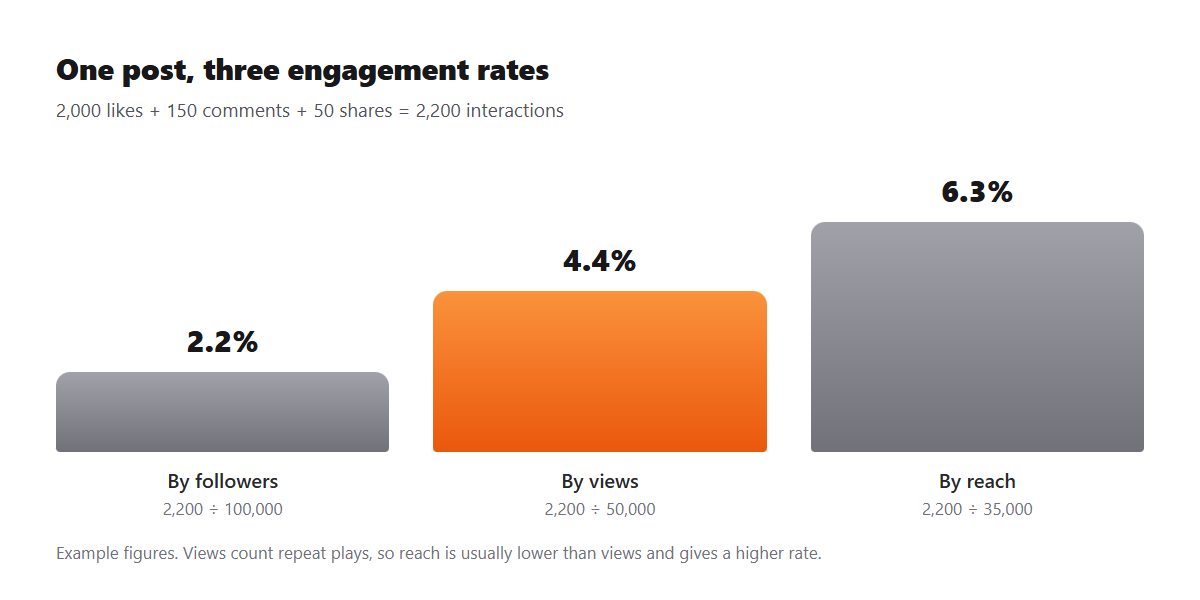
- The formula changes the answer. The same post can read 2%, 4% and 6% depending on whether you divide by followers, views or reach, as in the chart above.
For YouTube's (likes + comments) ÷ views, the calculator uses these rule-of-thumb bands:
| Rate | Rating | What it usually means |
|---|---|---|
| Under 1% | Low | Fewer than 1 in 100 viewers liked or commented |
| 1% to 3% | Average | Typical for big channels and broad, search-driven videos |
| 3% to 6% | Good | Viewers react more than on most videos |
| 6% or more | Excellent | A loyal audience, common for smaller niche channels |
For Instagram and TikTok, figures of roughly 1% to 5% are commonly cited as healthy, but treat any single number with care. The most useful benchmark is your own: work out the average of your last 10 to 20 posts, then see whether new posts beat it.
How to raise your engagement rate
- Ask one clear question. A specific question in the video or caption ("Which of these three would you pick?") gets more comments than "let me know what you think".
- Reply to comments early. Replies start conversations, and the replies of other viewers count too.
- Hook the first seconds. People who leave early rarely like or comment, and a strong opening keeps more of them watching.
- Post for the audience you already have. Content close to your best-performing posts tends to engage your existing viewers more than chasing a broad trend.
- Use pinned comments and chapters. A pinned comment gives viewers something to react to, and chapters help people jump to the part they came for instead of leaving.
- Don't buy views or followers. Bought audiences don't interact, so they push your rate down as well as breaking the platforms' rules.
FAQ
What is the engagement rate formula? Interactions (likes, comments, shares) divided by views, followers or reach, multiplied by 100.
How do I calculate the average engagement rate of a channel? Add up the likes and comments of its recent videos, divide by the total views of the same videos and multiply by 100. This weights each video by its views, so a viral upload counts for more; averaging each video's own rate instead gives every video an equal say. The calculator uses the first method.
Do dislikes count as engagement? They are an interaction, but dislike counts are hidden on YouTube, so most formulas leave them out. If you include them for your own videos, do it every time.
Do views count as engagement? No. Views are the audience you divide by. Counting them as interactions would push the rate towards 100%.
Is a high engagement rate always good? Usually, but a very high rate on a small sample (say 40 likes on 200 views) can drop as a video reaches people outside your core audience. Judge the trend over many posts.
More guides
- Concrete Mix Ratios Explained: M10, M15, M20 and M25 What 1:2:4 and M20 mean, the cement bags, sand and aggregate for 1 m³ of each grade, a slab worked from measurements to materials, and how to mix and cure it.
- Why Tracking Your Baby’s Growth Matters: A Parent’s Guide What weight, length and head size tell your doctor, normal growth by month on the WHO charts, how to read percentiles and when a change is worth a call.
- How Long to Thaw a Turkey: Times by Weight and a Thanksgiving Schedule USDA fridge and cold-water thaw times for 8 to 24 lb turkeys, the day to move yours to the fridge for Thanksgiving dinner, cooking from frozen and what to do if it’s still icy.